MESHERY: MULTI-CLUSTER KUBERNETES IN MINUTES
Your team just deployed Istio to three Kubernetes clusters. By week two, you’re manually SSH-ing into three kubeconfigs to debug traffic policies, waiting 45 minutes for perf test results, and explaining to stakeholders why your service mesh migration cost 200 engineering hours. You’re not alone—platform teams at Stripe, Shopify, and others hit the same wall when managing multi-mesh infrastructure at scale.
Enter Meshery, the CNCF-graduated Kubernetes manager trusted by HPE, VMware, and Intel. With 9.4k GitHub stars, 380+ cloud-native integrations, and a visual Kanvas editor, Meshery cuts multi-cluster mesh ops from days to hours. By November 2025, it’s the fastest way to link Istio, Linkerd, and Consul, run automated performance profiles, and share configs across teams—all without touching YAML.
In this guide, you’ll deploy Meshery in 5 minutes, connect multi-mesh workloads, run your first perf test, and learn why teams measure 10–40% latency reductions after adopting Meshery’s traffic policies. Ideal for SREs, platform engineers, and DevOps leads accelerating multi-cluster Kubernetes adoption.
Why Meshery Stands Out for Multi-Cluster Operations
Meshery isn’t a dashboard—it’s a management plane built for teams struggling with service mesh sprawl. Unlike single-cluster tools, Meshery unifies design, deployment, testing, and observability across Kubernetes, clouds, and service meshes:
Operational Impact (why teams choose Meshery):
- Reduce YAML debugging time by 60–80% through visual design validation before deployment.
- Test Istio performance in 10 minutes vs. 2+ hours of manual load-testing setups.
- Manage 5+ clusters from one control plane; dry-run policy changes across all simultaneously.
- Share infrastructure-as-code (Designs) across teams with RBAC and audit trails.
Technical Breadth (as of November 2025):
- 380+ Integrations: Istio, Linkerd, Consul, Cilium, Prometheus, Datadog, AWS, Azure, GCP, Kubernetes 1.28+.
- 220+ Catalog Designs: Vault, Dapr, WordPress, Redis—tested patterns you fork and customize in minutes.
- Performance Profiles: Built-in Fortio load gen; compare Istio vs Consul latency/throughput side-by-side.
- Extensions: 40+ gRPC adapters, ReactJS hot-loading, Rego policies—build internal developer platforms on Meshery.
vs. Alternatives: Rancher excels at multi-cloud fleet management but lacks mesh-specific tooling; Lens provides cluster visualization but no perf testing. Meshery is purpose-built for mesh lifecycle. See Rancher, OpenShift, Tanzu compared / for full platform breakdown.
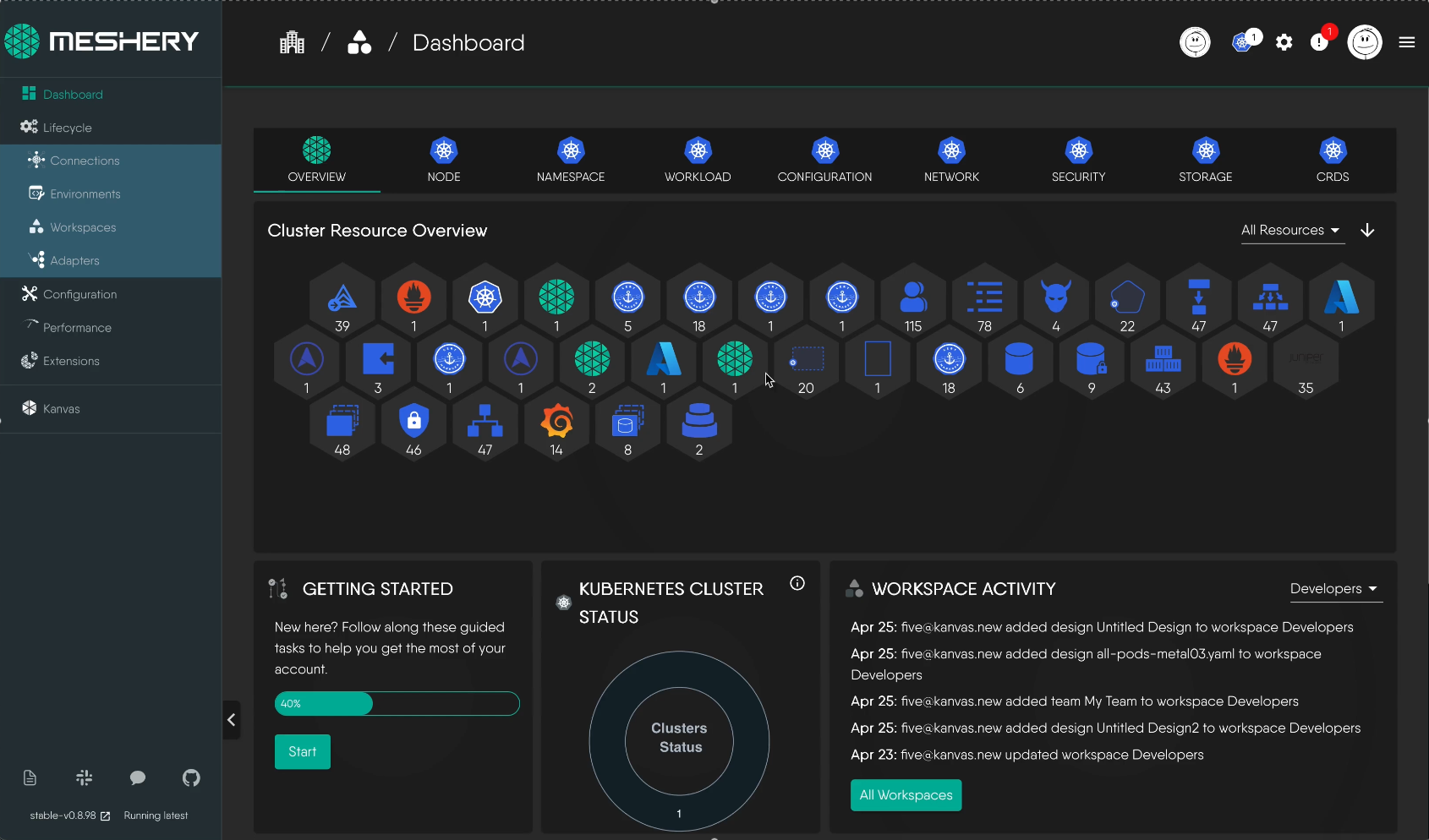
Hands-On: Install Meshery in Under 5 Minutes
Prerequisites: kubectl (1.28+), Helm 3, or Docker. Tested on Ubuntu 24.04 / devcontainer.
Option 1: Kubernetes (Recommended)
# Install mesheryctl (CLI superpowers)
curl -L https://meshery.io/install | PLATFORM=kubernetes bash -

# Start Meshery
mesheryctl system context create k8s --platform kubernetes --set
mesheryctl system start
Opens at http://localhost:9081. Port-forward if needed: kubectl port-forward svc/meshery 9081:9081 -n meshery.
Option 2: Docker Desktop
mesheryctl system context create docker --platform docker --set
mesheryctl system start
Option 3: Helm (Production)
kubectl create ns meshery
helm repo add meshery https://meshery.io/charts
helm install meshery meshery/meshery -n meshery
Validate: mesheryctl system status shows green across broker, database, server.
Connecting Service Meshes and Performance Testing
Once Meshery is running, connecting to your infrastructure is a matter of uploading kubeconfigs or pointing to managed clusters. Meshery automatically discovers and inventories all resources—deployments, services, pods—and provides adapters for Istio, Linkerd, Consul, and other service meshes.
The platform deploys internal components (MeshSync for resource discovery, Operator for policy enforcement) into your cluster’s Meshery namespace, then establishes two-way communication with your infrastructure. This eliminates the need for manual CRD patching or YAML scaffolding.
Performance testing becomes a first-class workflow: define load profiles (RPS, duration, concurrency), select target services, and Meshery’s built-in load generator collects latency percentiles, error rates, and throughput. Results are exportable and comparable across mesh implementations—Istio vs Linkerd vs bare Kubernetes services, for instance.
Live exploration is available via Meshery Playground , where you can deploy workloads and run performance experiments without local installation. Integrating performance baselines into your CI/CD pipeline becomes straightforward once you understand how Meshery’s REST and GraphQL APIs expose these workflows.
For deeper network analysis, pair Meshery’s data with CNI-level benchmarks / to understand the full stack’s contribution to latency and throughput.
Workspaces and Team Collaboration
Meshery’s Workspaces address a fundamental problem in infrastructure management: how to allow multiple teams to safely modify shared Istio policies, networking rules, and deployment templates without creating version-control chaos or accidental overwrites.
Workspaces serve as logical boundaries—think of them as Google Drive folders for your Kubernetes infrastructure. Each Workspace groups related Environments (K8s clusters, Prometheus instances, service mesh control planes) and Designs (infrastructure templates). Teams are granted roles (Viewer, Editor, Deployer) at the Workspace level, with RBAC enforced at each resource.
The Catalog component provides pre-built Designs—tested patterns for common deployments like databases, observability stacks, and service mesh configurations. Rather than hand-writing Istio VirtualServices or Kyverno policies, teams fork a Catalog Design, customize it in the visual editor, and deploy. Every change is audit-logged, versioned, and easily rolled back. This approach eliminates drift between environments and makes infrastructure decisions explicit and reviewable.
Designs can be shared across Workspaces, meaning a security team can publish a standardized egress policy that multiple product teams use while retaining the ability to extend it for their needs. Versioning means rolling back a bad deployment is as simple as selecting a prior Design snapshot.
Validation and Observability
Successful Meshery deployment means establishing connectivity across your infrastructure, confirming that performance testing runs without errors, and verifying team access to shared Designs. The platform provides diagnostics tools and logs to troubleshoot connectivity issues—checking whether the Meshery Operator is running, whether network ports are open, and whether kubeconfig credentials are valid.
Once operational, Meshery becomes a source of truth for infrastructure state. You can visualize relationships between components (Pod mounts, Service routes, Mesh policies), track historical performance baselines, and see audit trails of all configuration changes made through Workspaces. This observability layer reveals drift, unintended side effects, and performance regressions that might otherwise go unnoticed in multi-cluster deployments.
The first performance test typically takes longer than subsequent ones due to image caching. As teams build experience with Meshery’s workflows—defining performance profiles, comparing mesh implementations, dry-running policy changes—the platform becomes increasingly valuable as a collaboration hub. Debugging issues across clusters shifts from manual kubeconfig switching to a unified visual interface where context is preserved and audit history is automatic.
Adopting Meshery in Your Organization
The shift to visual, collaborative infrastructure management requires a phased approach. Early adopters typically begin by installing Meshery in a non-production environment and exploring Catalog Designs relevant to their stacks. This low-friction introduction builds familiarity without operational risk.
As teams gain confidence, they migrate existing hand-written Istio configurations into Designs, establishing performance baselines and comparing results against their previous setups. The ability to dry-run changes and see diffs before applying them becomes invaluable when stakes are high—a single misconfigured traffic policy can cascade across your microservices.
The long-term value emerges when infrastructure becomes truly collaborative. Platform teams publish standardized Designs; application teams consume and extend them. Changes flow through audit-logged Workspaces with clear RBAC boundaries. Performance regressions surface automatically via baseline comparisons. Multi-cluster operations that once required shell scripting and manual spreadsheets become repeatable, auditable, and reversible.
Further Reading
- Microservices Delivery Best Practices /—covers Istio, Linkerd deployment patterns.
- CNI Performance Deep Dive /—benchmark Cilium/Calico; pair with Meshery’s perf tests.
- Rancher, OpenShift, Tanzu Enterprise K8s Comparison /—Meshery’s role in larger platform strategies.
Community
- GitHub: meshery/meshery (9.4k stars, 1,200+ contributors, v0.8.172+).
- Slack: slack.meshery.io — Real-time support, #meshery channel.
- Docs: docs.meshery.io — Installation guides for every platform.
- Office Hours: Weekly Zoom calls; see community calendar .